

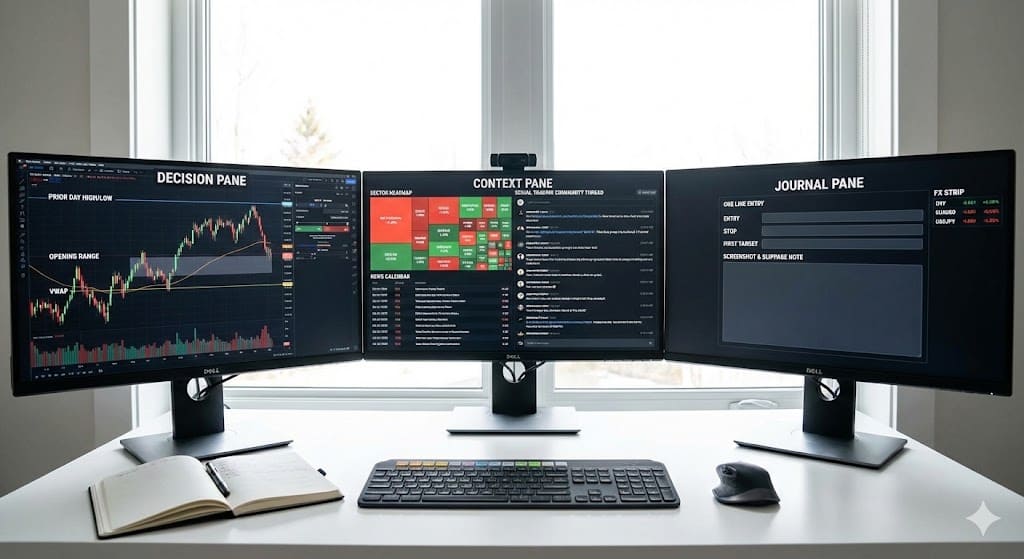
The bell is near, chat is buzzing, and you’ve got three tickers fighting for attention. A well-built Stock trading workstation turns that noise into a simple sequence: see the setup, size the risk, place the order, review the fill. No drama required.
“Preparation beats prediction when the tape gets loud.”
The core blueprint that keeps you confident
| Layer | What good looks like | Why it matters |
| Screens layout | One decision screen, one context screen, one journal screen | Fewer clicks, faster entries |
| Market data | Stable feed, scheduled maintenance noted, latency widget in view | You trade the market you see, not a delayed echo |
| Order entry | One-click brackets, OCO exits, hotkeys that match your plan | Risk is attached to every order |
| Notes & logs | Timestamped journal with screenshots | Lessons become reusable, not fuzzy memories |
| Community pane | Curated room plus muted watch channels | Signal without the scroll-trap |
“If a tool doesn’t change your position, size, route, or timing, it’s an ornament.”
Layout that thinks like a trader
- Decision pane: live chart with prior day high/low, opening range, and a simple midline like VWAP.
- Context pane: sector heatmap, news calendar, and your curated social trading community thread.
- Ticket pane: bracket templates on by default, with a fixed cash risk per trade.
- Journal pane: one-line entry (entry, stop, first target), plus a screenshot and slippage note after the exit.
Tiny quality-of-life wins
- Color code sessions so your brain knows where liquidity usually improves.
- Save two workspaces: “Open” for pace, “Midday” for patience.
- Keep a keyboard macro that drops a ready-to-edit plan into chat: Long above 52.10, SL 51.60, TP 53.10, size = $75 risk.
Real-time input without the dopamine trap
A smart social trading community is a force multiplier when you treat it like a data source, not a command center.
| Signal type | Keep when it includes | Skip when it’s just |
| Level callouts | Entry, stop, first target in one line | “I like XYZ” with no plan |
| News pings | Time-stamped, impact tagged | Hype with no sector context |
| Recaps | Chart plus slippage noted | Screenshot reels without exits |
“Follow fewer voices and demand receipts. Clarity compounds.”
Stocks on screen, macro in mind
Even if you trade equities, a tiny corner of your workstation can watch FX indices and rates for risk tone. That’s where the best forex traders to follow can quietly help: not to copy trades, but to read dollar strength, volatility in majors, and policy tone that often nudges equity rotations.
- Pin a concise FX dashboard: DXY, EURUSD, USDJPY, and a rate future.
- Save a curated list of analysts or rooms known for evidence, not excitement.
- When FX volatility spikes, reduce size on equity breakouts; your journal will thank you.
Two workstation recipes you can adopt today
| Style | Panels | First action each session | Risk note |
| Intraday momentum | Decision chart, ladder or depth, news mini, ticket, journal | Mark opening range and first retest | Half size in first 15 minutes |
| Swing with intraday entries | Daily/4H chart, intraday confirmation, sector map, ticket, journal | Update levels, set alerts, wait for retest | Finance and gap risk noted on ticket |
“Trade the retest when in doubt. It’s slower, and that’s the point.”
Operating routine that keeps you steady
- Pre-market: write three lines per candidate on your weekly stock watchlist—level, invalidation, first target.
- During the session: take one setup per name. If it misses, skip the chase.
- After exit: log spread at entry, slippage on exit, and rule breaks.
- End of day: archive three screenshots that teach tomorrow’s self something useful.
Safety rails baked into the desk
- Hard daily loss in cash ends the session.
- OCO brackets attach to every order.
- Hotkeys only for actions you would take slowly: reduce half, move stop to breakeven after target one, flatten all.
“Small size plus strict exits beats perfect entries.”
Quick vendor checklist for workstation software
| Question | Green-flag answer |
| Can I build one-click bracket templates per symbol | Yes, saved with the layout |
| Does the platform expose latency and maintenance in-app | Yes, localized time |
| Are fills exportable with venue, time, and slippage | Yes, CSV and API |
| Can chat or community panes be docked and muted by tag | Yes, with per-channel filters |
| Is journaling built-in or easily hotkeyed to an external tool | Yes, with screenshots auto-attached |
Bringing it together
If this lens fits, block 60 minutes to rebuild your layout: one decision screen, one context screen, one journal screen, and a small, curated feed from your social trading community. Add a tiny FX strip so you can learn from the best forex traders to follow without copying moves. Then run ten sessions at half size and keep only what your notes prove.
“A calm workstation turns minutes into edges, not impulses.”
FAQ
Do I need three monitors to be effective
No. Many traders thrive on a laptop plus one external monitor. The win comes from a clean layout, not screen count.
How much community is too much
If it changes your plan mid-trade, it’s too much. Treat the room like weather radar: useful before you drive, quiet while you drive.
Should I mirror forex trades if I trade stocks
Not necessary. Use FX for tone. If the dollar rips or craters, you’ll adjust equity size and expectations with less surprise.
What is the fastest upgrade for most desks
Bracket templates and a one-line plan macro. Risk gets attached to the click, and your notes become usable history.